

With Facetime, Apple has established its own voice and video chat, which supports both mobile devices with iOS and Mac systems from Mac OS X. In the following article we present the app for video telephony.
The use of Facetime is free. Outside of the WLAN, data may be incurred for the use of the mobile network.
In a conference, up to 32 participants can make calls together via group calls.
1. This is Facetime
Facetime is one Apple voice and video chatwith which you with others Users can make calls via a data connection. The service allows language telephony and Video telephonyin which you are about the Front camera can see your counterpart. Even audio and Video conferences Between up to 32 participants are possible.
The advantage of Facetime compared to a classic phone call is that you Instead of a paid telephone connection, establish them on the Internet and therefore do not incur any fees for a phone callno matter where the caller or called one is. The data for facetime usage is encrypted with a Transferred end-to-end encryption between the transmitter and receiver.

Danger: Due to censorship and state regulations, Facetime is not available in all countries and regions such as Saudi Arabia, the United Arab Emirates and Pakistan.
2. Facetime is free
Apple does not charge any fee for the function or for the use of Facetime. However, the transfer of audio and video files requires an active internet connection. As long as you are in a WLAN, that's not a problem. About 10 MB dates per minute.
Without a WLAN, FaceTime uses the mobile Internet via your data contract. For one minute facetime with video chat, about 2 to 4 MByte are data volume. The low data volume results from the reduced image quality as soon as the mobile internet is used instead of a WLAN.
2.1. Start data control and facetime in the mobile network
In the settings of iOS in the menu item “Mobile network“You can check for each app and thus also for Facetime how much data was used. If you do not want to use Facetime in the mobile network, because you, for example, have little or no data volume on the contract, for example, You can also deactivate Facetime for mobile data hereBy moving the slider to the left and thus deactivating FaceTime for mobile data.

How to save data volume: If you only use Facetime calls without video, you only need 500 KB per minute and thus protect your data volume.
3. Facetime works for these devices
Facetime is available for iPhones (from iPhone 4), iPads (from iPad 2), iPad Mini and the iPod touch (from 4th generation). You can also use Facetime on your Mac from MacOS X (Mojave).
If you use group calls, the hardware requirements are higher and require at least one iPhone from model 6S, iPad Air 2, iPad Mini 4, iPod touch from 7th generation) and an iOS from version iOS 12.1.4.
3.1. Alternatives for Windows or Android
Facetime is only available for Apple devices and is therefore not available for Windows, Android or the Linux desktop. Android has a comparable alternative with Google Hangouts and under Windows Skype is the video chat software from Microsoft, which is also available for all other platforms. We present five other alternatives to Skype in our separate article.
4. So you can activate and use FaceTime
To use Facetime on your device, you have to Activate FaceTime in the settings and link it to an Apple ID. They can then be reached on all devices with this Apple ID, i.e. the iPhone, the iPad and also on the Mac, if they have one.
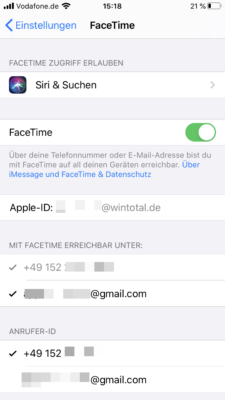
If you only want to be accessible via the number, deactivate in the section «Available with Facetime at“Simply the mail address of the Apple ID. Then the iPad no longer rings when someone calls it via Facetime, just the iPhone.
In the Facetime settings you will find the function at the bottom FaceTime Live Photos. If you activate this, you can also take live photos from your caller during the video chat, if you Both participants have activated this function.

4.1. Make with Facetime calls
To one Calling participants via Facetime, start the Facetime app on your device. Use the «Plus» symbol to select the contact with which you want to connect. If the participant only has one device without the number, for example an iPad, are Contacts also possible via its email addressif described under point 4.

Via the «Audio» buttons, build a Voice chat and a video call via the «Video» button.
The recipient of the call can accept or reject the call, and send a message on an iPhone as an answer.

4.2. Telephony about iMessage
If you are in contact with contact via Imessage, the Apple messenger, you can also start a FaceTime call via the «Facetime» button in the Messenger's head.

4.3. Invite participants for group calls
Facetime also offers group callsto hold a conference with up to 32 participants. To do this, add several contacts when calling up with which you want to make calls.

5. Functions during a Facetime call
Already while the conversation participant is selected, they hear a kind of «ringtone» and find buttons for effects, mute switching at the bottom, switch from the front to the back camera and end the connection.

The «Effects» buttons is only available on newer devices And offers, for example, the option of sending stickers and texts or changing the video image directly with different filters. You can also use the effects to make calls with a created memoji instead of your real video image.

5.1. Add more participants to a Facetime chat
Apple also installed something hidden a function, to one Add more participants to existing session. To do this, press the area with the four buttons longer during a FaceTime session. Then one appears one Selection to include more in the chat.

6. Video instructions on Facetime
In the following video you will get another explanation of how to set up and use Facetime:
(26 votes, average: 4,80 out of 5) Loading…


latest posts published

5k player-love of another audio/video reader

Search Lookeen 10 desktop replaces Windows Search

How to improve battery life in Samsung Galaxy S6

The perfect game pc in the test – What should really be able to do

How many cups of the CPU really need it

What is the modern configuration guest?

Why do memory stick folders appear as shortcuts?

O & O & Partitionation Particione Profession in version 3

How to find the right calendar app
