

If you are at home with your smartphone and the desktop system on two different platforms, you know the problem: the comparison of files, contacts or calendars does not always want to succeed without any problems and often requires the help of additional programs. This sometimes causes frustration and often anger. For the following article, we asked ourselves whether Microsoft can give the user with a smartphone based on Windows Phone 8.1 and Windows on a desktop PC as much feelings of happiness as Apple users can experience within their ecosystem between iPhone and MacOS.
The old problem – the round has to go to the square
If you are at home on several devices, you would like to keep part of your data, calendars and contacts on all devices. Thanks to cloud providers and many free offers, this is basically not a problem. The targeted synchronization with one device is often not so trivial. Many smartphones manufacturers therefore provide appropriate software to synchronize with files from the PC. Depending on the manufacturer and tool, it works more or less well. The ideal solution could therefore be the symbiosis of mobile device and desktop on the same platform as Apple presents with its products.
Cheap but not cheap – Nokia Lumia 630
We are aware of our article not For one of the high-end smartphones with Windows Phone 8.1, e.g. the very current Lumia 930. Our choice fell on the Lumia 630 entry-level device, which is offered in retail as a single and dual SIM device for 159 euros RRP.
With the Lumia 630 we wanted to get an impression of what devices from the lower price range in the meantime and whether the additional edition for higher -quality devices is really worthwhile. In contrast to Apple, for example, where customers only have a small selection of premium devices, Microsoft can offer a wide portfolio with the takeover of Nokia and the successful switch to an independent Windows Phone brand «Lumia» and open up so many layers of buyers.
Technical …
The Lumia 630 is a level above the newly released Lumia 530, which is once again a corner cheaper at just under 100 euros, but was slimmed down in terms of CPU performance and memory compared to the Lumia 630.
The smartphone has a 4.5-inch IPS display with a resolution of 854 x 480 pixels and a pixel density of 221 ppi and is powered by a Snapdragon 400 Quad-Core CPU with a clock of 1.2 GHz. The device has an internal memory of 512 MB, 8 GB mass storage and a microSD card slot, which takes up cards up to 128 GB. Unfortunately, WLAN IEEE 802.11 B/G/N, Bluetooth specification 4.0 as well as data connections up to HSDPA – 21.1 Mbit/s are not supported. The battery has a capacity of 1830 mAh. The device is also available as a dual SIM model, can then absorb two SIM cards at the same time and is ready for both reception. If a card is used for telephony, the transmission and reception unit is documented during this time. Two conversations about both cards are therefore not possible.
For more details, please refer to the Lumia 630 product link.
You can find test reports on Lumia 630, for example, at Inide-handy.de or Connect.
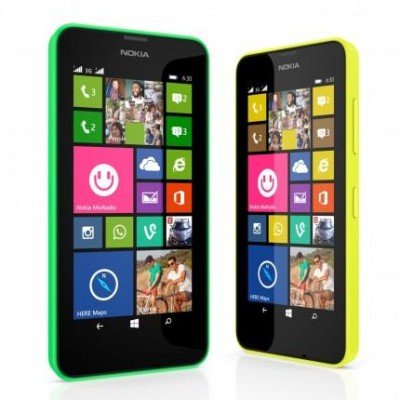
And optical
Despite the low price, the processing of the device is flawless. The rear plastic cover can be removed. Behind it are the interchangeable battery (there is actually something like that), the subjects for the SIM cards and for a microSD memory card.
The device is very good in the hand, but sometimes uncomfortably warm when surfing or other CPU intensive actions in the upper area. You don’t burn your fingers, but you can clearly feel how the CPU literally snaps into «air» in the entry -level device. The sound of the speaker, if you can call a tiny hole in the back, cannot be used for more than one wake -up tone. Here and with the integrated camera, which reaches its limits very quickly without a photo light or lightning, you can see the savings factors compared to a higher quality device.
If you are only looking for a good, easy -to -use smartphone, you could be happy with the Lumia 630. Basically, you don’t need “more” smartphones.
Windows Phone 8.1
The Lumia 630 is already delivered with Windows Phone 8.1, which offers some innovations compared to version 8.
- Apps can be installed on the microSD card
- You can use your favorite photo as a tiled background on the homepage.
- Rest mode, which directs all calls directly to the mailbox, and deactivated all notifications
- New Xbox video and Xbox Music app
- Wordflow keyboard for text input
- Improved search in content on the device, e.g. in the contacts or calendar entries
- Improvements in the information center, notifications and settings
- Better calendar
- Synchronizing passwords, app settings, favorites, tabs from Internet Explorer etc. with Windows
The voice assistant Cortana is currently only available in the USA.
You can find a complete list of all innovations on Windows Phone 8.1 at Microsoft.
Los geht´s
Connection with Windows
If you connect the smartphone to Windows 7 or Windows 8/8.1 using a micro USB cable (not included) with a PC, this is recognized and installed.
The device is then displayed as a changer on Windows 8.1 and offers access to its memory.
You can now move documents, music, ringtones, podcasts, photos and videos between the cell phone and computer.
Desktop application
After the first connection, the device is displayed in Windows and a reference to the free Windows Phone desktop application is given.
For Windows 7 and higher, Microsoft offers the Windows Phone desktop application, which offers the following features:
- Synchronizing of unprotected music, photos, films, television programs and podcasts from your existing Apple iTunes library or your Windows libraries with your Windows Phone 8
- Automatic import of images and videos that you have recorded with your cell phone on your PC
- Show information about the storage space so that you can see at a glance how much memory you use for every content type and can easily ensure that there is always enough memory
- Charging of playlists on your cell phone
- Search for songs that can be used as the ringtone and add these songs to your cell phone
After installation, the setup takes place. The user can indicate whether he wants to compare the device with iTunes (only unprotected media content) or the Windows libraries.
The comparison of content is done via the software and is very simple, but clearly kept.
And as an app
With the Windows Phone app, Microsoft also offers a solution for the Windows UI interface, which is touch-compatible and can also be installed on ARM tablets. Under Windows 8.1, the app is independently downloaded from the store after the first connection to the PC.
The pages «Applications for Synchronization» and «Synchronizing my Windows Phone» offer a good overview of the various options of the Sync functions.
Microsoft account and onedrive
Only with a used OneDrive account can the Windows Phone 8.1 correctly play its cloud connection and coupling with Windows 8.x.
Backup
Like the iCloud from Apple, the Cloud memory Onedrive from Microsoft serves as a backup medium. Under «Settings> Fuse», apps, settings, SMS, photos and videos can be automatically secured.
The securing of «apps and settings» includes a variety of information such as
- Apps installed on the cell phone, possibly with high scores and progress information
- Keywords for your accounts
- Your call list
- Accounts set up on your cell phone
- Layout and design color of your start screen
- Settings for your cell phone, for example for photos, messages, email and other accounts, the lock screen or speech recognition
Fuses can be managed via the smartphone, for example to delete older fuses.
You can find more information about the backup with OneDrive on the Saicing of Data.
Sync with other devices and Windows 8.x
The data in the cloud can not only be secured, but also synchronized with other devices based on Windows 8 or Windows Phone 8.1. Say: a variety of data like
- Photos and videos, documents
- Settings of designs, apps and Internet Explorer
- WLAN passwords (Sync only for safe WLAN networks)
Hiking between Windows Phone, Surface Tablet or Desktop-PC with Windows 8.1. A background image on the smartphone then also appears on the desktop, for example. Under Windows 8.1 you can also determine under PC settings -> OneDrive as well as to what should be synchronized in detail.
You can also find more information on the Synchronization of Documents with OneDrive and Settings and Personalization.
Calendar and contacts
As long as the user uses a calendar or contacts via a Microsoft account at Outlook.com, it is kept synchronously with the devices that access it. Google and iCloud accounts can also be integrated, but then do not offer all functions.
A comparison of contacts and appointments via Outlook or other pims is not intended. Microsoft offers a guide «Synchronizing contacts and calendars from Outlook on the PC for my cell phone» with the help of the Outlook Hotmail Connector, which in fact is only postponed or copying existing contacts to the Cloud charity service from Microsoft. For Exchange users, probably only in larger company networks, the whole thing is a little easier, because the smartphone then connects directly to Exchange.
It is surprising that Microsoft weakens as much as the data compared to the data with your own pim. We would have expected this discipline from a smartphone with Windows operating system, since it was one of the strengths of the faded «Windows Mobile» devices up to version 6.
The comparison via the cloud is not a useful option for users who like to work with local PST files for contacts, calendars and emails. This is why Microsoft does not offer an improvement compared to other solutions such as the Apple ICloud Control Panel for Windows, which integrates the contacts and calendars from the iCloud in Outlook as an external data source.
Conclusion
Microsoft primarily uses its own cloud service for comparison – like Apple. With files, however, you have to save them in OneDrive or connect them to the PC, since the automatic sync function includes a lot, but no work data.
But that Microsoft is leaving Outlook users in the rain and offers no way to compensate for local contacts and calendars with the device. It is also not a consolation that Microsoft integrates connectivity to the services of Google and from its own house like Outlook.com.
Here Microsoft should definitely improve and rethink whether you do not want to retrofit this option via software.
latest posts published

5k player-love of another audio/video reader

Search Lookeen 10 desktop replaces Windows Search

How to improve battery life in Samsung Galaxy S6

The perfect game pc in the test – What should really be able to do

How many cups of the CPU really need it

What is the modern configuration guest?

Why do memory stick folders appear as shortcuts?

O & O & Partitionation Particione Profession in version 3

How to find the right calendar app
