

Soon we will see the Windows 9 evaluation version, which is expected this fall or at the beginning of winter (after other sources – in September or October this year). The official launch of the new operating system will be, according to rumors, between April – October 2015 (there is more information in this regard).
I am waiting for Windows 9, and until then I want to meet what, what awaits us in the new version of the operating system. The information presented is based on official Microsoft statements, as well as on different rumors and information leaks, so something I will mention we can not see in the final version.
For desktop computer users
First of all, Microsoft claims that Windows 9 will be easier to use for desktop computer users, whose use is made with the mouse and keyboard.
In Windows 8, a lot of effort has been made to make comfortable intended for tablet owners and tactile screens.
However, this effort to a certain extent has been made towards the «damage» of the usual PC users: unnecessary starting screen, doubling the elements of the cotol panel, lack of shortcuts-are not all disadvantages, but the general idea is summed up that the user must do more operations for those tasks, which could be done in one or two mouse. the whole area of the screen.
In Windows 8.1 update 1 eliminated many of these shortcomings: the possibility of entering the desktop appeared after loading the system, the context menu, window control buttons (closed, minimize and others), default started to start the desktop programs (in the absence of the touch screen).
The Start menu in Windows 9
Windows 9 will have the old start menu, although a little modified. The screenshots say that it will show you something like that, as you can see in the image below.
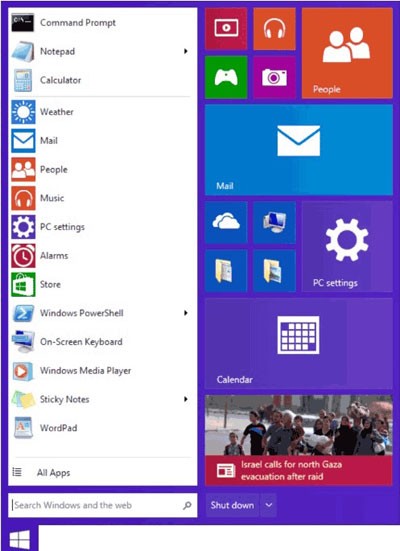
As you can see, in the new start menu we will have access to:
- Search
- Libraries (Downloads, Pictures)
- Items of the control panel
- Rubrica «My Computer»
- Programs commonly used
- Stopping and restarting your computer
- The right area is allocated for applications – I think we will be able to choose what to put there
I think it is quite useful, but as it will be in practice – we will see. On the other hand, it is not clear enough, why did they remove the «Start» menu for two years, and then put it back, Microsoft with its resources can’t provide everything?
Virtual desktops
According to available information, virtual desktop will be presented in Windows 9 for the first time. I don’t know how it will be done, but I’m glad.
Virtual desktops-one of those things, which can be useful for those who work on the computer: with documents, images or anything else. At the same time, virtual desktops are already present in Mac OS and different Linux distributions (in the image below an example of Mac OS).
I am waiting for this innovation, this is one of the most interesting innovations for me personally.
What’s new?
Besides the mentioned ones, Windows 9 will have other changes, which are already known:
- Running applications in metro windows on desktop
- There is talk that the right panel will disappear (Charms Bar)
- Windows 9 will only be launched in the 64 -bit version
- Improved energy management – a core of the processor will be in the waiting mode in case the processor pregnancy is small, as a result – a quieter and colder system with the autonomy of the battery
- New gestures for tablet users on Windows 9
- Better integration with cloud services
- A new method of activation through the Windows Mazazin, as well as the possibility to save the key to activation on a flash drive (USB stick) in ESD-retail format
I think nothing I forgot. According to some online sources, this fall Microsoft will start the Windows 9th marketing campaign. And with the launch of the evaluation version, I will be one of the first, which will install it.
Conclusion
The anticipation surrounding the release of Windows 9 reflects the ongoing evolution of Microsoft’s operating systems and the growing expectations of users worldwide. As technology advances, each new version of Windows carries the promise of improved performance, modern design, and enhanced integration with both hardware and cloud-based services. Based on the official statements and the many rumors circulating within the tech community, Windows 9 is expected to address the shortcomings of its predecessors while introducing innovative features that align with the needs of modern computing.
If the projected release timeline — between April and October 2015 — holds true, Windows 9 could mark a significant turning point for Microsoft. Users anticipate a more refined interface, perhaps one that balances the classic desktop experience with the tile-based design introduced in Windows 8. Moreover, better synchronization across devices, faster system responsiveness, and greater customization options are likely to define the next generation of Windows.
While some of the information currently available remains speculative, it is clear that Microsoft is focused on creating a more unified and user-friendly ecosystem. This approach could bridge the gap between desktop, tablet, and mobile platforms, offering seamless transitions and improved productivity. As we wait for the evaluation version expected later this year, users and developers alike are eager to test the system’s new capabilities and see how it performs in real-world conditions.
In conclusion, Windows 9 represents more than just another update — it symbolizes Microsoft’s commitment to innovation, adaptability, and user experience. Whether all the rumored features make it to the final release or not, one thing is certain: the next version of Windows will continue shaping the way millions of people interact with technology every day.
latest posts published

5k player-love of another audio/video reader

Search Lookeen 10 desktop replaces Windows Search

How to improve battery life in Samsung Galaxy S6

The perfect game pc in the test – What should really be able to do
How many cups of the CPU really need it

What is the modern configuration guest?

Why do memory stick folders appear as shortcuts?

O & O & Partitionation Particione Profession in version 3
How to find the right calendar app
