

Even if for the inscription of CDs or DVDs in the latest Windows versions we can give up special programs, the functionality incorporated in the system is often insufficient. In addition, for some users the built -in inscription function may seem uncomfortable.
In this article we will analyze some programs, designed to register the different types of CDs in the Windows operating system. I will analyze only programs that can be downloaded and used for free. Commercial products, such as Nero Burning Rom I will not analyze.
IMGBURN-I think it is the most program for inscribed CDs (between free)
With the help of the IMGBurn program you can register not only CDs and DVDs, but also Blu-ray, with the appropriate unit. You have the opportunity to inscribe video content for further watching in a video player, creating boot discs and registering ISO images, as well as data discs, which you can keep documents, photos and anything else. Compatible with Windows XP, 7 and 8.
The official website of the program, where you can download it for free: http://www.imgburn.com/index.php?act=download
During the installation the program will try to install some additional additional applications: they refuse, they are not useful, and only create garbage in the system.
In the main window of the program (the Romanian language is not supported, in any case I have not found) you will see simple icons for basic functions:
- Inscribes the Disk Image (Write Image To Disk) image
- Create a disc image (Create Image File From Disk)
- Inscription files and disk folders (Write Files/Folders to Disk)
- Creates an image from files and folders (created image from files/folders)
- As well as functions to check the disk
Even if the IMGBurn program is simple and easy to use, for an experienced user it offers a lot of useful functions. Also, the program is updated regularly and has high rating of free products of this type.
Ashampoo Burning Studio Free
Another free program for recording discs: CD, DVD or Blu-ray, with data, audio, video, etc. Also, with Ashampoo Burning Studio Free you can create disk images, wipe the re -inscribable disc, etc. The program has support for the Romanian language and can be downloaded from the manufacturer’s website https://www.ashampoo.com/en/eur/7110/burning-software/ashampoo-burning-studio-free
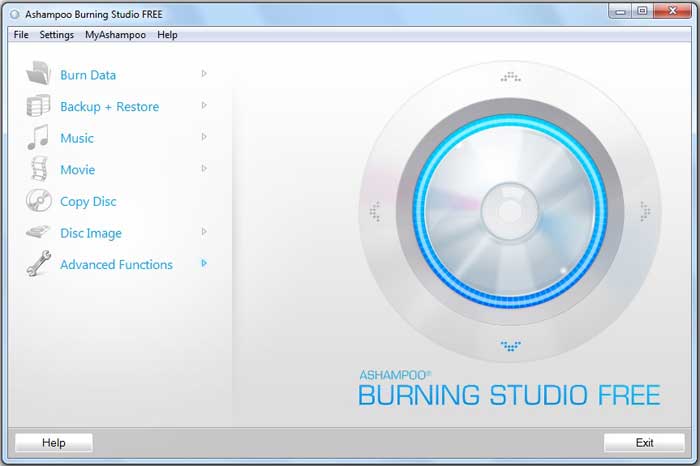
One of the main advantages of the program – simple interface. The inscription of the disc is organized in such a way that any user can register discs.
CDBurnerXP
Even if the CDBurnerxp program does not have a friendly interface, it has everything a user can need to incorporate CDs or DVDs. With this program you can register CDs and DVDs, including registered boot discs and ISO files. And although, as I said, the interface is not the most friendly, the program is quite simple. To download the CDBurnerxp program for free, access the manufacturer’s website, it also has support for the Romanian language.
BurnAware Free
Burnware has several products for the inscription of the discs, including a free one, which can be downloaded here: the program has no support for the Romanian language, it works in all versions of the Windows operating system, starting with Windows XP. During installation the program will try to install additional toolbars in the browser, give up those bars.
With the help of Burnware you can inscribe different types of discs-audio, CD, DVD and Blu-ray data, DVD with video, as well as to inscribe a disc image. Has support for creating boot discs. There is also the option to delete the re -inscribable disc.
Active ISO Burner
If you need to register an ISO image on the disc, Active ISO Burner – one of the most advanced methods. At the same time, the simplest. The program supports all recent versions of Windows, and can be downloaded for free from the official website
While using the computer, the hard disk accumulates a large number of unnecessary files. If the computer does not clean this garbage, over time the computer will start to work slower. This is due to the fact that the hard disk does not have enough space, and the files are strongly fragmented during writing. In this article we will talk about how the computer of useful files and programs is cleaned and how to bring it back to the previous speed.
latest posts published

5k player-love of another audio/video reader

Search Lookeen 10 desktop replaces Windows Search

How to improve battery life in Samsung Galaxy S6

The perfect game pc in the test – What should really be able to do

How many cups of the CPU really need it

What is the modern configuration guest?

Why do memory stick folders appear as shortcuts?

O & O & Partitionation Particione Profession in version 3

How to find the right calendar app
