

Since Windows NT 4, the boot loader has been part of the scope of delivery of the «large» Windows versions. The boot loader starts the installed and existing Windows versions. If you subsequently install an older Windows or unprepared, you can experience a nasty surprise because the boot loader can be easily damaged. With this article, we clarify the structure, repair and expansion of the boot loader.
1. Structure and sequence of the boot loader
The boot loader is written on the first (visible) primary partition of the system – usually the drive C:, even if Windows NT/2000/XP was installed on another partition. Anyone who uses a «real» boot manager in front of the NT boat loader will find the boot loader on the first visible partition for NT.
In this first system partition, the installation writes the start code in the boot sector.
The start code automatically calls the program when starting up ntld on, then ntdetect.com Starts and then the file boot.ini evaluated. For certain controllers, the driver NTBOODD.SSYS is also reloaded.
1.1 Allocation in the boot.ini
In the boot.ini it is listed which operating systems the boot loader should/can start from which point:
A «normal» boot.ini looks as follows:
[boot loader]
timeout=2
default=multi(0)disk(0)rdisk(0)partition(1)WINDOWS
[operating systems]
multi(0)disk(0)rdisk(0)partition(1)WINDOWS=“Microsoft Windows XP Professional“ /fastdetect
The «Default» entry indicates the operating system, which is started automatically after the counter (= timeout). If there are several entries under «Operating Systems», the «Default» entry makes sense.
The «Operating Systems» entry includes all operating systems found in the system at the time of setting up the boot loader. However, the entries can also be expanded afterwards.
The partitions are specified according to the so -called advanced risk computing (ARC) specifications.
multi(X)disk(Y)rdisk(Z)partition(W)WINDOWS=“NAME“
For most systems, the values Multi (X) and Disk (y) «0» are standard.
Only for devices that do not allow access to the boot plate via the INT13 of the BIOS must the entry in the boot.ini specially adapted.
The entry Rdisk (Z) indicates the drive. It is counted at «0».
The entry partition (W) indicates the partition. However, the counting method is not easy to look through. Windows numbered the partitions on a hard drive according to type and not continuous. Starting with «1», the primary and then the logical drives are counted.
Example:
Windows is installed on a hard drive with a primary and an extended partition in which there are 2 logical drives, to the first logical drive. -> W = 2; Multi (0) Disk (0) Rdisk (0) Partition (2) Winnt = “Windows” /Fastdektect
If the order of the partitions is now changed subsequently, e.g. a 2nd primary partition in front of the extended drive, the place of the above installation also moves to W = 3. If the boot.ini is not adjusted, the boot loader can no longer start the system.
2. Restore bootloader
2.1 Windows 2000 damaged XP
If you install Windows 2000 or NT after an existing Windows XP, the boot loader is damaged in places. Specifically, Windows 2000, for example, overwrites the NTLDR file with a version with which Windows XP can no longer start.
The problem can be easily remedied by copying the damaged files from any Windows or the recovery console to the boot drive:
COPY x:I386NTLDR C:
2.1 New construction of the boot loader
If the NT boat loader is further damaged, a little more manual work is necessary.
To do this, boot the computer from the Windows XP-CD (change the boot order in the BIOS), then switch to the repair mode with the “R” key using a recovery console. If you only have a recovery CD available, you can also use the Windows 2000 or XP installation diskettes, which is available for download from Microsoft.
Now you are in the restoration console.
Here you put with me Fixboot C: a new boot sector.
If other files have been overwritten on the boot drive (formatted plate, files deleted), further files must be made.
First you copy
COPY x:I386NTLDR C:
COPY x:I386NTDETECT.COM C:
on the hard disk (note the path. X and C).
Then you give the command bootcfg /rebuild a. The program hereby searches for Windows installations and asks the «finds» about the advertisement name. As a result, you get a new boot.ini. The KB Article 291980 explains further parameters from BootcfG.
To restart the computer and leave the recovery console, you just have to exit input.
2.2 Bootcode overwritten by Win9x/Me-secure for inclusion in the NT boat loader
A subsequent installation of Windows 9x/ME damages the code in the boat sector and overwrites it with its own code. As a result, the NTDLR file is no longer loaded.
The trick is now that the Win9x code is extracted from the boot sector and connected to the Windows 2000/XP boob loader again.
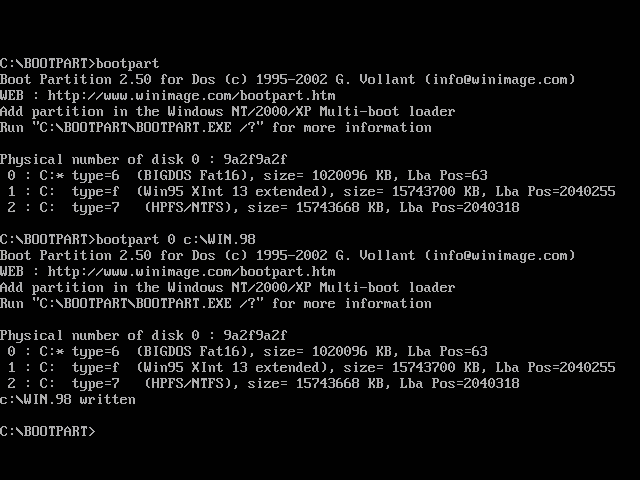
To do this, first extract the boot sector of the boot partition in a file with the free DOS tool Bootpart. In our case the command would be bootpart 0 C:WIN.98
 |
|
Boot part, note parameter |
Then restore the boot loader as described at 2.1 and then continue at 3.2.
3. Submit new operating system in the boot.ini
3.1 Record Windows NT, 2000 or XP
Further NT/2000/XP systems can be easily entered by specifying the target partition in the boot.ini. Boot.ini is a hidden and writing -protected file in the root of the first visible partition.
To edit, you would first have to remove writing protection and “hidden” at short notice. It is easy to use the Control Panel -> System -> «Advanced» tab and «edit» settings and restore them in the follow -up windo
In the «Operating Systems» section, the goal of the new Windows NT/2000/XP is entered in accordance with the explanations previously made at 1.1:
multi(X)disk(Y)rdisk(Z)partition(W)WINDOWS=“NAME“
Example:
multi(0)disk(0)rdisk(0)partition(2)WINNT=“Windows“ /fastdetect
Here is Windows on a hard drive with a primary and an extended partition in which there are 2 logical drives, installed on the first logical drive.
3.2 Record Windows 9x or other operating systems
“Foreign” operating systems can be integrated into the boot.ini in 2 steps.
On the one hand, you need the boot sector of the operating system, as we wrote it in the Win.98 file under 2.2. It doesn’t matter whether the secured boot sector is Windows 98, Windows ME or DOS (or another operating system).
In the «Operating Systems» section, you create a new entry in the «Operating Systems» section for each operating system. For our Windows 98 this would be:
C:win.98=“Windows 98″.
4. Safe is certain – copy of the boot files
If you often handle other systems or changed partitions, you should make a copy of the boot files. To do this, format a floppy disk under Windows 2000/XP-but without the «Create MS-DOS start disk» function. The boat sector of the diskette can start the NTLDR. The remaining files NTLDR, NTDETT.com and boot.ini Copy the floppy disk manually. With this floppy disk, the system can also be booted if the boot loader was damaged on the starting partition.
With this small assistance, the simultaneous operation of 2 different systems should work without problems. At this point, however, we would like to give the note that the best choice is a separate boot manager for more complex tasks. The selection here is very extensive and ranges from Spartan freeware to the expensive full -price product.
latest posts published

5k player-love of another audio/video reader

Search Lookeen 10 desktop replaces Windows Search

How to improve battery life in Samsung Galaxy S6

The perfect game pc in the test – What should really be able to do

How many cups of the CPU really need it

What is the modern configuration guest?

Why do memory stick folders appear as shortcuts?

O & O & Partitionation Particione Profession in version 3

How to find the right calendar app
