

An Easter Egg (in German «Easter egg») is a surprise in a computer program hidden by the developer in information technology. These can be photos, cliparts, films, music, new features, small games or funny messages. These should give an indication of the creator and, in most cases, are not even known to the official publisher of the software. In this article, we use various examples to show you how to get an Easter Egg.
The authors of the software would like to immortalize themselves with the virtual Easter eggs in their software and at the same time offer users an entertaining entertainment.
In addition to applications, operating systems, browsers and playing, Easter Eggs are now also found on numerous websites and even in mobile apps.
The first Easter Egg is said to have been programmed for the Atari console in 1978. The developer Warren Robinett hid a secret room in the game «Adventure», which in turn contained its name. According to Atari's philosophy, it was not allowed to reveal the names of the technicians.
1. Meaning: How does an Easter Egg differ from a «hidden feature»?
Every now and then hidden or difficult -to -reach functions in programs and applications are also erroneously referred to as Easter eggs. In order for an Easter Egg by definition, but also described as such, three basic requirements must be met:
- The feature has no obvious benefit for the user
- The function or information must have been intentionally installed
- And it should be entertaining and entertaining
Good to know: Different sources attribute the name Easter Egg back to the well-known fabergé eggs. The artistically decorated jewelry eggs of the jewelry family of the same name always contained small surprises.
2. The best Easter Eggs in computer games
Almost every World of Warcraft In the course of his career, players stumbled across the infamous «chicken pet». To get it, stand in Westfall (or in the forest of Elwyn) in front of a chicken and Gackern repeatedly via the chat command /chicken to. You will then receive a quest and as a reward one of the poultry as a pet.
Not very up -to -date but still good: In the ego shooter classic Doom 2 If you find a digital Easter egg of the bloody species. The programmers quickly smuggled the separated head of developer legend John Romero (whipped on a spear). This presents itself as a final boss and must be destroyed with a rocket launcher.
Good to know: When John Romero learned about the head with his head, in return he installed a sound sampl at the level of level, which played the message backwards «To win this game you have to kill me, John Romero!“Revealed.

In the firmware of the Nintendo Switch, an Easter Egg is hidden with a rather sad background. By separating the console from the Internet and putting the date of the device on June 11 (you can of course also wait simply), you will get access to a version of the NES game «Golf». June 11th is the death of the former Nintendo President Satoru Iwata, who has succumbed to cancer. «»Golf“Was the first title to work on.
To start the game, with the help of the Joy-Con controller you have to imitate the gesture with which Satoru Iwata has started each of his Nintendo Direct presentations during his lifetime.
In Call of Duty – Black Ops 2 are even included with complete retro games. To do this, you have to shoot on the heads of the manure dolls on the nuketown map (and of course ideally also meet them). You can then call the games over the TV in the middle of the square.
3. Easter Eggs in Microsoft Office Programmen
In the Microsoft Office programs, too, there are sometimes very elaborately made Easter eggs, which even go back to 1995. For example, a flight simulator with the mouse is hidden in Excel 97. To do this, a new workbook must be opened and the F5 button pressed. Then you can start by entering «X97: L97», one-time pressing of the Shift key, pressing the Ctrl and the SHIFT button together as well as a click on the diagram assistant in the simulator toolbar.
The flight through the purple mountains with rainbow is not the only hidden fun in Microsoft Office. In Excel 2000 there is a car racing game, at Word 97 a pinball machine and in Excel 2010 you can even find a stripped down version of the adventure classic Monkey Island.
Office 2016 does not contain any known Easter Eggs and 2020 was finally over with funny: Founder Bill Gates decided to make the software even safer and also prohibited all Easter Eggs in the course of the course.
4. Popular Easter Eggs in browsers and on websites
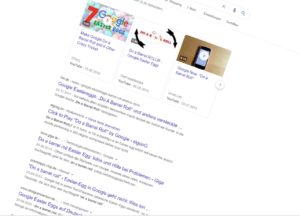
Google's makers also prove humor and have hidden numerous Easter Eggs in their products. For example, enter the «Do a Barrel Roll» term into the search bar, the browser window turns around your own axis. However, it is a little more playful by entering the term “Atari Breakout“In the picture search: This starts the arcade game of the same name, which enjoyed great popularity in the 70s in arcades.
The command «zerg rush“In the address line of the Chrome browser, you bring to a small game in which you have to click down letters in a given time. And if you put the Pegman (the small yellow male) in Google Maps in the area of Area 51 (southern Nevada, USA), it turns into a UFO on the map.

Tipp: A sorted and categorized list with all Google Easter Eggs can be found here.
The Mozilla Firefox shows after entering “about:mozilla» or «about:robots“Hidden news. You can play the game classic Pacman in all known browsers: Simply give the command“google.com/pacman“In the address line.
5. Easter Eggs under Android and iOS
Of course, Google also delivers Easter Eggs in its Android operating system-and since version 2.3. Gingerbread, in which a statue of the gingerbread man is displayed as a zombie. In the latest version Android 10, several hide Nonogram (Japanese puzzles) that you can activate as follows:
- In the settings of your Android device, go to «Telephone information -> software information“.
- Click the entry «Android-Version“.
- An Android logo with a large 10 is now displayed on the screen.
- Move the two digits so that a Q is created And then click the Android lettering several times.
Owners of an Apple iPhone can also look forward to one or the other surprise. However, these are more details than Easter Eggs in the real sense. For example, the symbol of language notes indicates exactly the vibrations that speak when speaking the word «Apple“Coming up and the symbol of the stock app the course of the course with which the Apple share overtook competitor Dell on the stock exchange in 2006.
(53 votes, average: 4,40 out of 5) Loading…


latest posts published

5k player-love of another audio/video reader

Search Lookeen 10 desktop replaces Windows Search

How to improve battery life in Samsung Galaxy S6

The perfect game pc in the test – What should really be able to do

How many cups of the CPU really need it

What is the modern configuration guest?

Why do memory stick folders appear as shortcuts?

O & O & Partitionation Particione Profession in version 3

How to find the right calendar app
