
In the meantime, audio /video conferences are available in abundance. Freeware, open source and commercial programs always take on the problem of different formats for different end devices. What makes the Xilisoft Video Converter so special that we present this software separately? A lot!
Diversity and no overview
We already had a variety of audio and video concerts in the test, which we set in our software archive or even discussed in detail as a presentation. So far, the optimal “one in all” solution has not been there. Many of the free and open source programs lack a simple operation or there are trouble with dependencies on other packages, which first have to be installed by hand, with codec chaos through various codec packs, with lack of features and, above all, with moderate performance. Purchase programs such as the recently presented cyberlink Mediaespresso use the possibilities of modern graphics cards that offer NVIDIA CUDA & ATI Stream technologies to get the graphics card on board the graphics card in order to process the conversion jobs much faster. Ideally, videos are converted up to 10 times faster than using these techniques.
Tools for all cases
Xilisoft offers a large portfolio of conversion solutions of all kinds on its website. In addition to the many special applications, the Xilisoft Video Converter has aroused our interest in the Ultimate Edition, since the range of functions seems to be justice what we have been looking for for a long time.
Video Converter and more
The Xilisoft Video Converter, which can also convert audio formats, is available in 3 editions. An overview matrix can be found on the manufacturer's homepage. We have published ourselves for the Ultimate Edition, which also offers cutting functions with which advertising can be removed, for example, at the beginning and end of a recording.
Xilisoft Video Converter Ultimate can convert almost all audio and video formats, including AVI, MPEG, WMV, Divx, MP4, H.264/AVC, AVCHD, MKV, RM, MOV, XVID, 3GP etc., into other formats. The software offers a variety of profiles with the right settings for e.g. PSP, PS3, iPod, iPhone, Apple TV, Xbox, Android devices, iPad.
With the tool you can also convert or create MKV containers, e.g. AVI in MKV, Divx into MKV or AVCHD into MKV.

|
|
Video Converter surface |
The program interface is very well structured: the functional bar above, including the jobliste with the files, which should be converted. Among them are a view of the available CPU cores and their load as well as two icons for Cuda and AMD/ATI Stream.
In our example, the AMD/ATI stream technology is active (HD5770 CHIP). The tool symbol can use the tool symbol to determine how many kernels you want to use for conversion and activate the hardware support of the graphics card. The software checks whether the current driver is installed for the function. In our test, the Ati Media Codec Package was not installed and was complained to be missing. With this hint a layperson can do something, very good. The hardware acceleration could only be activated after the installation.

|
|
Hardware acceleration |
The conversion settings for each file determine via ready -made profiles that can be found in the lower program window.

|
|
Formate |
Xilisoft Video Converter already offers finished profiles for a variety of known devices and also indicates whether the conversion to this format is accelerated by the GPU (graphics card). In our example, these are two of the HD formats (ATI symbol) displayed.
The details of the profile can be displayed on the right side, whereby the display includes general values, details about the video codec, audio codec or metadata.
If that is not enough, you can change and adapt a bar with extended settings and the values and specifications contained therein.

|
|
Details |
Added value cutting function
Those who often absorb shipments will surely be annoyed from time to time that the good old VPS signal has not survived the digital age. The result is advertising blocks at the beginning and end of every recording. With the Ultimate Edition of Xilisoft Video Converter you can solve the problem because the software offers cutting functions. You can not only specify the beginning and the end, but also set blocks and elegantly remove advertising breaks.
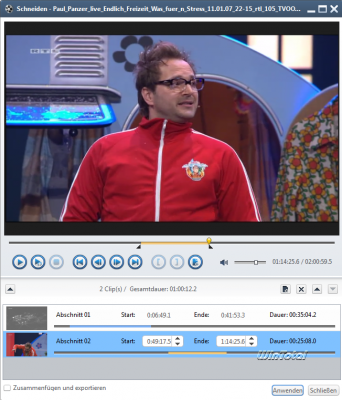
|
|
Cutting functions |
Video Converter can also divide videos into several files by setting the time or size and thus packing it into suitable snacks for certain multimedia devices.
Tools and effects
Another feature is the possible effects for conversion. This includes a cutting function, color adjustment, watermarks, various effects such as black/white or Sephia, oil paint, reflection etc.

|
|
Bonds |
With the exception of the color effects, however, these make sense for pictures than with entire videos.

|
|
Bonds |
Conclusion
Functional scope, performance and operation make Xilisoft Video Converter the best converter that we had in the editorial team so far. Beginners are not overwhelmed thanks to the profiles, while ambitious video fans can influence numerous parameters. With a price of 45 euros, the Ultimate Edition is not a bargain, but the purchase quickly pays off again with frequent conversions thanks to the hardware acceleration.

|
Xilisoft Video Converter Ultimate
|
| Manufacturer: | Xilisoft |
| Preis | that. 45 euros |
| System: | Windows 7, Vista, XP |
| Positive: | Hardware acceleration, clear, video editing |
| Negative: | – |
(38 votes, average: 4,00 out of 5) Loading…


latest posts published

5k player-love of another audio/video reader

Search Lookeen 10 desktop replaces Windows Search

How to improve battery life in Samsung Galaxy S6

The perfect game pc in the test – What should really be able to do

How many cups of the CPU really need it

What is the modern configuration guest?

Why do memory stick folders appear as shortcuts?

O & O & Partitionation Particione Profession in version 3

How to find the right calendar app
